# OpenClaw
# 大模型配置
# baseUrl
# apiKey
# 通义千问
# 豆包
# 新手入门
# 保姆级教程
教程简介
欢迎来到 OpenClaw 的世界!作为一个初次接触 AI 应用的新手,面对满屏的代码和配置文件难免会感到无从下手。本文用最通俗易懂的语言,带你一步步完成 OpenClaw 的大模型接入配置,涵盖三大核心概念入门、如何从阿里云通义千问和字节跳动豆包获取配置参数、配置文件完整模板,以及保姆级配置步骤。
## 新手必看!龙虾(OpenClaw)大模型配置保姆级教程
欢迎来到 OpenClaw 的世界!作为一个初次接触 AI 应用的新手,面对满屏的代码和配置文件难免会感到无从下手。别担心,这篇文章将为你拨开迯雾,用最通俗易懂的语言,带你一步步完成 OpenClaw 的大模型接入配置。
## 1、三大核心概念入门简介(baseUrl、apiKey 和 model id)
在配置大模型时,你一定会反复遇到三个关键词:baseUrl、apiKey 和 model id。你可以把调用大模型想象成“向一位博学多才的专家写信请教问题”。
### (1)baseUrl(基础地址)
**是什么:** 这是大模型服务商提供的 API 接口地址,各大模型平台(如通义千问、豆包等)均会提供。
**打个比方:** 这相当于专家的“收件地址”。没有这个地址,你的问题就无法送达。
例如通义千问:https://dashscope.aliyuncs.com/compatible-mode/v1
### (2)apiKey(秘钥)
**是什么:** 服务商分配给你的一串唯一字符,用于验证身份和计费。
**打个比方:** 这是你的“专属通行证”。专家凭此确认是你发来的请求,并从你的账户扣除相应费用。请务必妥善保管,切勿泄露给他人。
例子:`sk-a1b2c3d4e5f6g7h8...`
### (3)model id(模型名称 / ID)
**是什么:** 同一家服务商旗下通常提供多个不同版本的大模型(有的能力强但价格高,有的响应快但相对经济),你需要明确指定使用哪一个。各服务商平台的模型列表中均会详细列出。
**打个比方:** 这是你要请教的“具体哪一位专家”的名字。
例子:`qwen3.5-flash`、`qwen3.5-plus`
### (4)如何获取
上面 3 个参数不仅支持各大服务商接口,也支持中转 API。鉴于龙虾的强大 Token 消耗能力,本地部署一些大模型也是不错的选择。部署好之后,同样支持这 3 个参数的配置。
下面以阿里云通义千问和字节跳动豆包为例,介绍如何获取以上三项配置信息。
**以 阿里云·通义千问(Qwen)为例:**
- **获取 apiKey:** 登录阿里云百炼控制台,在右上角头像旁找到“API-KEY”,点击创建一个新的 API Key。
- **baseUrl:** 千问兼容 OpenAI 格式的接口地址通常固定为 https://dashscope.aliyuncs.com/compatible-mode/v1。
- **model id:** 常用的有 `qwen3.5-flash`(经济快捷)、`qwen3.5-plus`(性能均衡,推荐)、`qwen3-max`(能力最强)。
**以 字节跳动·火山引擎·豆包(Doubao)为例:**
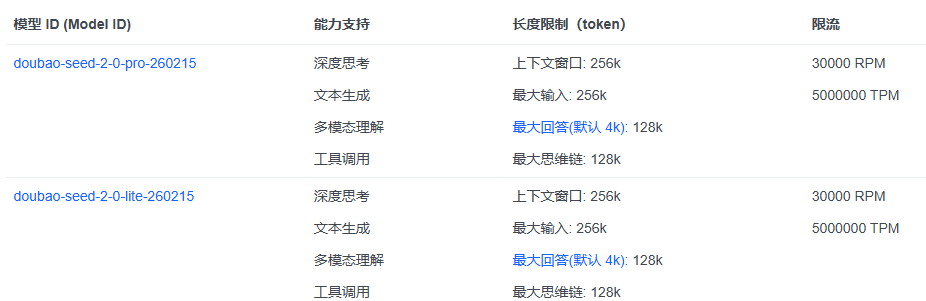
- **获取 apiKey:** 登录火山引擎控制台,在“API Key 管理”中创建;也可以在选择具体模型后,通过“API 接入”相关入口找到对应的 API Key。
- **baseUrl:** 通常固定为 https://ark.cn-beijing.volces.com/api/v3。
- **model id:** 目前常用的通用模型有 `doubao-seed-2-0-lite-260215`、`doubao-seed-2-0-pro-260215` 等。

1
了解三大核心概念
2
获取大模型参数
3
找到 OpenClaw 配置文件
代码示例
openclaw setup
4
备份原文件
5
替换配置文件内容
代码示例
{
  "models": {
    "mode": "merge",
    "providers": {
      "custom-001": {
        "baseUrl": "xxxxx",
        "apiKey": "xxxxxx",
        "api": "openai-completions",
        "models": [
          {
            "id": "qwen-plus",
            "name": "qwen-plus (Custom Provider)",
            "reasoning": false,
            "input": [
              "text"
            ],
            "cost": {
              "input": 0,
              "output": 0,
              "cacheRead": 0,
              "cacheWrite": 0
            }
          }
        ]
      }
    }
  },
  "agents": {
    "defaults": {
      "model": {
        "primary": "custom-001/qwen-plus"
      },
      "models": {
        "custom-001/qwen-plus": {}
      },
      "workspace": "C:\\Users\\Administrator\\.openclaw\\workspace",
      "contextPruning": {
        "mode": "cache-ttl",
        "ttl": "1h"
      },
      "compaction": {
        "mode": "safeguard"
      },
      "heartbeat": {
        "every": "30m"
      }
    }
  },
  "tools": {
    "profile": "coding",
    "web": {
      "search": {
        "enabled": true,
        "provider": "gemini",
        "gemini": {
          "apiKey": "sk-xxxxxxxxxx"
        }
      }
    }
  },
  "commands": {
    "native": "auto",
    "nativeSkills": "auto",
    "restart": true,
    "ownerDisplay": "raw"
  },
  "session": {
    "dmScope": "per-channel-peer"
  },
  "hooks": {
    "internal": {
      "enabled": true,
      "entries": {
        "boot-md": {
          "enabled": true
        },
        "bootstrap-extra-files": {
          "enabled": true
        },
        "command-logger": {
          "enabled": true
        },
        "session-memory": {
          "enabled": true
        }
      }
    }
  },
  "gateway": {
    "port": 18789,
    "mode": "local",
    "bind": "loopback",
    "controlUi": {
      "allowedOrigins": [
        "http://localhost:18789"
      ]
    },
    "auth": {
      "mode": "token",
      "token": "f2f4f617fe7a38cde2449495204c053d18168dcbc6d8ab61"
    },
    "tailscale": {
      "mode": "off",
      "resetOnExit": false
    },
    "nodes": {
      "denyCommands": [
        "camera.snap",
        "camera.clip",
        "screen.record",
        "contacts.add",
        "calendar.add",
        "reminders.add",
        "sms.send"
      ]
    }
  },
  "skills": {
    "install": {
      "nodeManager": "npm"
    },
    "entries": {
      "goplaces": {
        "apiKey": "sk-xxxxxxxxxxxxxx"
      },
      "nano-banana-pro": {
        "apiKey": "sk-xxxxxxxxxxxxxxxxxxxxx"
      },
      "notion": {
        "apiKey": "sk-xxxxxxxxxxxxxxxxxxxx"
      },
      "openai-image-gen": {
        "apiKey": "sk-xxxxxxxxxxxxxxxxxxxxx"
      },
      "openai-whisper-api": {
        "apiKey": "sk-xxxxxxxxxxxxxxxxxxxx"
      },
      "sag": {
        "apiKey": "sk-xxxxxxxxxxxxxxxxxxxxx"
      }
    }
  }
}
6
确认默认模型路径
7
处理其他服务的 API Key(可选)
8
保存并重启 OpenClaw
代码示例
openclaw gateway restart
返回教程列表
觉得有用?分享给更多朋友吧